Compare commits
21 Commits
| Author | SHA1 | Date | |
|---|---|---|---|
 MarcinZiabek MarcinZiabek
|
8551e1f33f | ||
|
MarcinZiabek
|
3d0ca07b43 | ||
|
MarcinZiabek
|
a67fa754af | ||
|
MarcinZiabek
|
208235ad1e | ||
|
Marcin Ziąbek
|
f24416474a | ||
|
MarcinZiabek
|
01c2e8d3f5 | ||
|
MarcinZiabek
|
b3cef238ec | ||
|
Marcin Ziąbek
|
aede62c135 | ||
|
MarcinZiabek
|
db9db95dcc | ||
|
MarcinZiabek
|
92263685d7 | ||
|
MarcinZiabek
|
ba4be521aa | ||
|
Marcin Ziąbek
|
f6967dfe8b | ||
|
MarcinZiabek
|
ff3dfe7831 | ||
|
MarcinZiabek
|
5a1990d857 | ||
|
Marcin Ziąbek
|
9c64a6bc8d | ||
|
MarcinZiabek
|
5402e5fedc | ||
|
MarcinZiabek
|
fdf8e3eb1a | ||
|
LoxSmoke
|
456c7a735b | ||
|
LoxSmoke
|
5bf2a9a3d3 | ||
|
MarcinZiabek
|
69e268733c | ||
|
MarcinZiabek
|
657bbe2aac |
@@ -16,7 +16,7 @@ namespace QuestPDF.Examples
|
||||
.PageSize(PageSizes.A4)
|
||||
.ProducePdf()
|
||||
.ShowResults()
|
||||
.Render(x => GenerateStructure(x, 16));
|
||||
.Render(x => GenerateStructure(x, 12));
|
||||
}
|
||||
|
||||
private void GenerateStructure(IContainer container, int level)
|
||||
|
||||
@@ -24,7 +24,7 @@ namespace QuestPDF.Examples
|
||||
|
||||
page.Margin(20);
|
||||
page.Size(PageSizes.A4);
|
||||
page.Background(Colors.White);
|
||||
page.PageColor(Colors.White);
|
||||
|
||||
page.Content().Column(column =>
|
||||
{
|
||||
|
||||
@@ -24,7 +24,7 @@ namespace QuestPDF.Examples
|
||||
{
|
||||
page.Size(PageSizes.A6);
|
||||
page.Margin(5);
|
||||
page.Background(Colors.White);
|
||||
page.PageColor(Colors.White);
|
||||
|
||||
page.Header().Column(column =>
|
||||
{
|
||||
|
||||
@@ -742,7 +742,7 @@ namespace QuestPDF.Examples
|
||||
{
|
||||
container
|
||||
.Padding(25)
|
||||
.PaddingLeft(75)
|
||||
.PaddingLeft(50)
|
||||
.Column(column =>
|
||||
{
|
||||
column.Item().Width(300).Height(150).Background(Colors.Blue.Lighten4);
|
||||
|
||||
@@ -23,6 +23,8 @@ namespace QuestPDF.Examples.Engine
|
||||
private bool ApplyCaching { get; set; }
|
||||
private bool ApplyDebugging { get; set; }
|
||||
private RenderingTestResult ResultType { get; set; } = RenderingTestResult.Images;
|
||||
|
||||
private bool ShowingResultsEnabled = true;
|
||||
|
||||
private RenderingTest()
|
||||
{
|
||||
@@ -114,7 +116,7 @@ namespace QuestPDF.Examples.Engine
|
||||
Func<int, string> fileNameSchema = i => $"{FileNamePrefix}-${i}.png";
|
||||
document.GenerateImages(fileNameSchema);
|
||||
|
||||
if (ShowResult)
|
||||
if (ShowResult && ShowingResultsEnabled)
|
||||
Process.Start("explorer", fileNameSchema(0));
|
||||
}
|
||||
|
||||
@@ -123,7 +125,7 @@ namespace QuestPDF.Examples.Engine
|
||||
var fileName = $"{FileNamePrefix}.pdf";
|
||||
document.GeneratePdf(fileName);
|
||||
|
||||
if (ShowResult)
|
||||
if (ShowResult && ShowingResultsEnabled)
|
||||
Process.Start("explorer", fileName);
|
||||
}
|
||||
}
|
||||
|
||||
@@ -21,7 +21,7 @@ namespace QuestPDF.Examples
|
||||
{
|
||||
page.Margin(20);
|
||||
page.Size(PageSizes.A7.Landscape());
|
||||
page.Background(Colors.White);
|
||||
page.PageColor(Colors.White);
|
||||
|
||||
page.Header().Text("With ensure space").SemiBold();
|
||||
|
||||
|
||||
@@ -19,11 +19,12 @@ namespace QuestPDF.Examples
|
||||
{
|
||||
page.Size(PageSizes.A4);
|
||||
page.Margin(2, Unit.Centimetre);
|
||||
page.Background(Colors.White);
|
||||
page.DefaultTextStyle(TextStyle.Default.Size(20));
|
||||
page.PageColor(Colors.White);
|
||||
page.DefaultTextStyle(x => x.FontSize(20));
|
||||
|
||||
page.Header()
|
||||
.Text("Hello PDF!").SemiBold().FontSize(36).FontColor(Colors.Blue.Medium);
|
||||
.Text("Hello PDF!")
|
||||
.SemiBold().FontSize(36).FontColor(Colors.Blue.Medium);
|
||||
|
||||
page.Content()
|
||||
.PaddingVertical(1, Unit.Centimetre)
|
||||
@@ -48,48 +49,5 @@ namespace QuestPDF.Examples
|
||||
|
||||
Process.Start("explorer.exe", "hello.pdf");
|
||||
}
|
||||
|
||||
[Test]
|
||||
public void MinimalApi2()
|
||||
{
|
||||
RenderingTest
|
||||
.Create()
|
||||
.ProduceImages()
|
||||
.ShowResults()
|
||||
.RenderDocument(container =>
|
||||
{
|
||||
container.Page(page =>
|
||||
{
|
||||
page.Size(PageSizes.A4);
|
||||
page.Margin(2, Unit.Centimetre);
|
||||
page.Background(Colors.White);
|
||||
page.DefaultTextStyle(TextStyle.Default.Size(20));
|
||||
|
||||
page.Header()
|
||||
.Text("Hello PDF!")
|
||||
.SemiBold()
|
||||
.FontSize(36)
|
||||
.FontColor(Colors.Blue.Medium);
|
||||
|
||||
page.Content()
|
||||
.PaddingVertical(1, Unit.Centimetre)
|
||||
.Column(x =>
|
||||
{
|
||||
x.Spacing(20);
|
||||
|
||||
x.Item().Text(Placeholders.LoremIpsum());
|
||||
x.Item().Image(Placeholders.Image(200, 100));
|
||||
});
|
||||
|
||||
page.Footer()
|
||||
.AlignCenter()
|
||||
.Text(x =>
|
||||
{
|
||||
x.Span("Page ");
|
||||
x.CurrentPageNumber();
|
||||
});
|
||||
});
|
||||
});
|
||||
}
|
||||
}
|
||||
}
|
||||
+19
-11
@@ -8,15 +8,15 @@ using QuestPDF.Infrastructure;
|
||||
|
||||
namespace QuestPDF.Examples
|
||||
{
|
||||
public class PageBackgroundForeground
|
||||
public class PageBackgroundForegroundExample
|
||||
{
|
||||
[Test]
|
||||
public void Test()
|
||||
public void PageBackgroundForeground()
|
||||
{
|
||||
RenderingTest
|
||||
.Create()
|
||||
.PageSize(550, 400)
|
||||
.ProducePdf()
|
||||
.ProduceImages()
|
||||
.MaxPages(100)
|
||||
.ShowResults()
|
||||
.RenderDocument(document =>
|
||||
{
|
||||
@@ -25,15 +25,23 @@ namespace QuestPDF.Examples
|
||||
page.Size(PageSizes.A4);
|
||||
page.Margin(1, Unit.Inch);
|
||||
page.DefaultTextStyle(TextStyle.Default.FontSize(16));
|
||||
page.PageColor(Colors.White);
|
||||
|
||||
page.Foreground()
|
||||
.AlignMiddle()
|
||||
.AlignCenter()
|
||||
.Text("Watermark")
|
||||
.FontSize(64)
|
||||
.FontColor(Colors.Blue.Lighten3);
|
||||
const string transparentBlue = "#662196f3";
|
||||
|
||||
page.Background()
|
||||
.AlignTop()
|
||||
.ExtendHorizontal()
|
||||
.Height(200)
|
||||
.Background(transparentBlue);
|
||||
|
||||
page.Header().Text("Background and foreground").Bold().FontColor(Colors.Blue.Medium).FontSize(24);
|
||||
page.Foreground()
|
||||
.AlignBottom()
|
||||
.ExtendHorizontal()
|
||||
.Height(250)
|
||||
.Background(transparentBlue);
|
||||
|
||||
page.Header().Text("Background and foreground").Bold().FontColor(Colors.Blue.Darken2).FontSize(36);
|
||||
|
||||
page.Content().PaddingVertical(25).Column(column =>
|
||||
{
|
||||
@@ -21,7 +21,7 @@ namespace QuestPDF.Examples
|
||||
{
|
||||
page.Margin(20);
|
||||
page.Size(PageSizes.A7.Landscape());
|
||||
page.Background(Colors.White);
|
||||
page.PageColor(Colors.White);
|
||||
|
||||
page.Header().Text("With show once").SemiBold();
|
||||
|
||||
|
||||
@@ -21,7 +21,7 @@ namespace QuestPDF.Examples
|
||||
{
|
||||
page.Margin(20);
|
||||
page.Size(PageSizes.A7.Landscape());
|
||||
page.Background(Colors.White);
|
||||
page.PageColor(Colors.White);
|
||||
|
||||
page.Header().Column(column =>
|
||||
{
|
||||
|
||||
@@ -23,7 +23,7 @@ namespace QuestPDF.Examples
|
||||
.PageSize(PageSizes.A4)
|
||||
.ProducePdf()
|
||||
.ShowResults()
|
||||
.Render(x => ComposeBook(x, chapters));
|
||||
.RenderDocument(x => ComposeBook(x, chapters));
|
||||
}
|
||||
|
||||
[Test]
|
||||
@@ -42,8 +42,8 @@ namespace QuestPDF.Examples
|
||||
RenderingTest
|
||||
.Create()
|
||||
.PageSize(PageSizes.A4)
|
||||
.ProducePdf()
|
||||
.Render(x => ComposeBook(x, chapters));
|
||||
.ProducePdf()
|
||||
.RenderDocument(x => ComposeBook(x, chapters));
|
||||
}
|
||||
|
||||
IEnumerable<float> PerformTest(int attempts)
|
||||
@@ -102,37 +102,30 @@ namespace QuestPDF.Examples
|
||||
}
|
||||
}
|
||||
|
||||
private void ComposeBook(IContainer container, ICollection<BookChapter> chapters)
|
||||
private void ComposeBook(IDocumentContainer container, ICollection<BookChapter> chapters)
|
||||
{
|
||||
var subtitleStyle = TextStyle.Default.Size(24).SemiBold().Color(Colors.Blue.Medium);
|
||||
var normalStyle = TextStyle.Default.Size(14);
|
||||
|
||||
ComposePage(container);
|
||||
|
||||
void ComposePage(IContainer container)
|
||||
container.Page(page =>
|
||||
{
|
||||
container
|
||||
.Padding(50)
|
||||
.Decoration(decoration =>
|
||||
{
|
||||
decoration
|
||||
.Content()
|
||||
.Column(column =>
|
||||
{
|
||||
column.Item().Element(Title);
|
||||
column.Item().PageBreak();
|
||||
column.Item().Element(TableOfContents);
|
||||
column.Item().PageBreak();
|
||||
page.Margin(50);
|
||||
|
||||
page.Content().Column(column =>
|
||||
{
|
||||
column.Item().Element(Title);
|
||||
column.Item().PageBreak();
|
||||
column.Item().Element(TableOfContents);
|
||||
column.Item().PageBreak();
|
||||
|
||||
Chapters(column);
|
||||
Chapters(column);
|
||||
|
||||
column.Item().Element(Acknowledgements);
|
||||
});
|
||||
column.Item().Element(Acknowledgements);
|
||||
});
|
||||
|
||||
page.Footer().Element(Footer);
|
||||
});
|
||||
|
||||
decoration.After().Element(Footer);
|
||||
});
|
||||
}
|
||||
|
||||
void Title(IContainer container)
|
||||
{
|
||||
container
|
||||
|
||||
@@ -29,9 +29,10 @@ namespace QuestPDF.Examples
|
||||
.Padding(10)
|
||||
.Text(text =>
|
||||
{
|
||||
text.DefaultTextStyle(TextStyle.Default.Size(20));
|
||||
text.DefaultTextStyle(TextStyle.Default.FontSize(20));
|
||||
text.Span("This is a normal text, followed by an ");
|
||||
text.Span("underlined red text.").FontSize(20).FontColor(Colors.Red.Medium).Underline();
|
||||
text.Span("underlined red text").FontColor(Colors.Red.Medium).Underline();
|
||||
text.Span(".");
|
||||
});
|
||||
});
|
||||
}
|
||||
@@ -81,7 +82,7 @@ namespace QuestPDF.Examples
|
||||
.Padding(10)
|
||||
.Text(text =>
|
||||
{
|
||||
text.DefaultTextStyle(TextStyle.Default.Size(20));
|
||||
text.DefaultTextStyle(TextStyle.Default.FontSize(20));
|
||||
text.Span("This is a random image aligned to the baseline: ");
|
||||
|
||||
text.Element()
|
||||
@@ -191,7 +192,7 @@ namespace QuestPDF.Examples
|
||||
text.EmptyLine();
|
||||
|
||||
text.Span("The new text element also supports injecting custom content between words: ");
|
||||
text.Element().PaddingBottom(-10).Height(16).Width(32).Image(Placeholders.Image);
|
||||
text.Element().PaddingBottom(-4).Height(16).Width(32).Image(Placeholders.Image);
|
||||
text.Span(".");
|
||||
|
||||
text.EmptyLine();
|
||||
@@ -203,7 +204,7 @@ namespace QuestPDF.Examples
|
||||
|
||||
text.EmptyLine();
|
||||
|
||||
text.ExternalLocation("Please visit QuestPDF website", "https://www.questpdf.com");
|
||||
text.Hyperlink("Please visit QuestPDF website", "https://www.questpdf.com");
|
||||
|
||||
text.EmptyLine();
|
||||
|
||||
@@ -238,7 +239,7 @@ namespace QuestPDF.Examples
|
||||
.Padding(10)
|
||||
.Text(text =>
|
||||
{
|
||||
text.DefaultTextStyle(TextStyle.Default);
|
||||
text.DefaultTextStyle(TextStyle.Default.FontSize(20));
|
||||
text.AlignLeft();
|
||||
text.ParagraphSpacing(10);
|
||||
|
||||
@@ -248,7 +249,7 @@ namespace QuestPDF.Examples
|
||||
text.Span("and this is slightly bigger text.").FontSize(16);
|
||||
|
||||
text.Span("The new text element also supports injecting custom content between words: ");
|
||||
text.Element().PaddingBottom(-10).Height(16).Width(32).Image(Placeholders.Image);
|
||||
text.Element().PaddingBottom(-4).Height(16).Width(32).Image(Placeholders.Image);
|
||||
text.Span(".");
|
||||
|
||||
text.EmptyLine();
|
||||
@@ -257,7 +258,7 @@ namespace QuestPDF.Examples
|
||||
{
|
||||
text.Line($"{i}: {Placeholders.Paragraph()}");
|
||||
|
||||
text.ExternalLocation("Please visit QuestPDF website", "https://www.questpdf.com");
|
||||
text.Hyperlink("Please visit QuestPDF website", "https://www.questpdf.com");
|
||||
|
||||
text.Span("This is page number ");
|
||||
text.CurrentPageNumber();
|
||||
@@ -269,5 +270,106 @@ namespace QuestPDF.Examples
|
||||
});
|
||||
});
|
||||
}
|
||||
|
||||
[Test]
|
||||
public void MeasureIssueWhenSpaceAtLineEnd()
|
||||
{
|
||||
// issue 135
|
||||
|
||||
RenderingTest
|
||||
.Create()
|
||||
.ProduceImages()
|
||||
.ShowResults()
|
||||
.RenderDocument(container =>
|
||||
{
|
||||
container.Page(page =>
|
||||
{
|
||||
page.Margin(50);
|
||||
page.PageColor(Colors.White);
|
||||
|
||||
page.Size(PageSizes.A4);
|
||||
|
||||
page.Content().Text("This is a specially crafted sentence with a specially chosen length for demonstration of the bug that occurs ;;;;;. ").FontSize(11).BackgroundColor(Colors.Red.Lighten3);
|
||||
});
|
||||
});
|
||||
}
|
||||
|
||||
[Test]
|
||||
public void EmptyText()
|
||||
{
|
||||
// issue 135
|
||||
|
||||
RenderingTest
|
||||
.Create()
|
||||
.ProduceImages()
|
||||
.ShowResults()
|
||||
.RenderDocument(container =>
|
||||
{
|
||||
container.Page(page =>
|
||||
{
|
||||
page.Margin(50);
|
||||
page.PageColor(Colors.White);
|
||||
|
||||
page.Size(PageSizes.A4);
|
||||
|
||||
page.Content().Text(" ").FontSize(11).BackgroundColor(Colors.Red.Lighten3);
|
||||
});
|
||||
});
|
||||
}
|
||||
|
||||
[Test]
|
||||
public void Whitespaces()
|
||||
{
|
||||
// issue 135
|
||||
|
||||
RenderingTest
|
||||
.Create()
|
||||
.ProduceImages()
|
||||
.ShowResults()
|
||||
.RenderDocument(container =>
|
||||
{
|
||||
container.Page(page =>
|
||||
{
|
||||
page.Margin(50);
|
||||
page.PageColor(Colors.White);
|
||||
|
||||
page.Size(PageSizes.A4);
|
||||
|
||||
page.Content().Text(" x ").FontSize(11).BackgroundColor(Colors.Red.Lighten3);
|
||||
});
|
||||
});
|
||||
}
|
||||
|
||||
[Test]
|
||||
public void DrawingNullTextShouldNotThrowException()
|
||||
{
|
||||
RenderingTest
|
||||
.Create()
|
||||
.ProduceImages()
|
||||
.ShowResults()
|
||||
.RenderDocument(container =>
|
||||
{
|
||||
container.Page(page =>
|
||||
{
|
||||
page.Margin(50);
|
||||
page.PageColor(Colors.White);
|
||||
|
||||
page.Size(PageSizes.A4);
|
||||
|
||||
page.Content().Column(column =>
|
||||
{
|
||||
column.Item().Text(null);
|
||||
|
||||
column.Item().Text(text =>
|
||||
{
|
||||
text.Span(null);
|
||||
text.Line(null);
|
||||
text.Hyperlink(null, "http://www.questpdf.com");
|
||||
text.TotalPages().Format(x => null);
|
||||
});
|
||||
});
|
||||
});
|
||||
});
|
||||
}
|
||||
}
|
||||
}
|
||||
@@ -0,0 +1,80 @@
|
||||
using System.Diagnostics;
|
||||
using QuestPDF.Fluent;
|
||||
using QuestPDF.Helpers;
|
||||
using QuestPDF.Infrastructure;
|
||||
using QuestPDF.Previewer;
|
||||
|
||||
Document
|
||||
.Create(container =>
|
||||
{
|
||||
container.Page(page =>
|
||||
{
|
||||
page.Size(PageSizes.A4);
|
||||
page.Margin(2, Unit.Centimetre);
|
||||
page.PageColor(Colors.White);
|
||||
page.DefaultTextStyle(x => x.FontSize(14));
|
||||
|
||||
page.Header()
|
||||
.Text("Hello PDF!")
|
||||
.SemiBold().FontSize(36).FontColor(Colors.Blue.Medium);
|
||||
|
||||
page.Content()
|
||||
.PaddingVertical(1, Unit.Centimetre)
|
||||
.Table(table =>
|
||||
{
|
||||
table.ColumnsDefinition(columns =>
|
||||
{
|
||||
columns.ConstantColumn(30);
|
||||
columns.RelativeColumn();
|
||||
columns.ConstantColumn(75);
|
||||
columns.ConstantColumn(75);
|
||||
columns.ConstantColumn(75);
|
||||
});
|
||||
|
||||
table.Header(header =>
|
||||
{
|
||||
var textStyle = TextStyle.Default.SemiBold();
|
||||
|
||||
header.Cell().Element(DefaultCellStyle).Text("#").Style(textStyle);
|
||||
header.Cell().Element(DefaultCellStyle).Text("Item name").Style(textStyle);
|
||||
header.Cell().Element(DefaultCellStyle).AlignRight().Text("Price").Style(textStyle);
|
||||
header.Cell().Element(DefaultCellStyle).AlignRight().Text("Count").Style(textStyle);
|
||||
header.Cell().Element(DefaultCellStyle).AlignRight().Text("Total").Style(textStyle);
|
||||
|
||||
static IContainer DefaultCellStyle(IContainer container)
|
||||
{
|
||||
return container.PaddingBottom(5).BorderBottom(1).PaddingBottom(5);
|
||||
}
|
||||
});
|
||||
|
||||
foreach(var i in Enumerable.Range(1, 100))
|
||||
{
|
||||
var price = Placeholders.Random.Next(100, 999) / 100f;
|
||||
var count = Placeholders.Random.Next(1, 10);
|
||||
var total = price * count;
|
||||
|
||||
table.Cell().Element(DefaultCellStyle).Text(i);
|
||||
table.Cell().Element(DefaultCellStyle).Text(Placeholders.Label());
|
||||
table.Cell().Element(DefaultCellStyle).AlignRight().Text($"{price:N2} $");
|
||||
table.Cell().Element(DefaultCellStyle).AlignRight().Text(count);
|
||||
table.Cell().Element(DefaultCellStyle).AlignRight().Text($"{total:N2} $");
|
||||
|
||||
static IContainer DefaultCellStyle(IContainer container)
|
||||
{
|
||||
return container.PaddingBottom(5).BorderBottom(1).BorderColor(Colors.Grey.Lighten1).PaddingBottom(5);
|
||||
}
|
||||
}
|
||||
});
|
||||
|
||||
page.Footer()
|
||||
.AlignCenter()
|
||||
.Text(x =>
|
||||
{
|
||||
x.Span("Page ");
|
||||
x.CurrentPageNumber();
|
||||
x.Span(" of ");
|
||||
x.TotalPages();
|
||||
});
|
||||
});
|
||||
})
|
||||
.ShowInPreviewer();
|
||||
@@ -0,0 +1,18 @@
|
||||
<Project Sdk="Microsoft.NET.Sdk">
|
||||
|
||||
<PropertyGroup>
|
||||
<OutputType>Exe</OutputType>
|
||||
<TargetFramework>net6.0</TargetFramework>
|
||||
<ImplicitUsings>enable</ImplicitUsings>
|
||||
<Nullable>enable</Nullable>
|
||||
</PropertyGroup>
|
||||
|
||||
<ItemGroup>
|
||||
<ProjectReference Include="..\QuestPDF.Previewer\QuestPDF.Previewer.csproj" />
|
||||
</ItemGroup>
|
||||
|
||||
<ItemGroup>
|
||||
<Compile Remove="HotReloadManager.cs" />
|
||||
</ItemGroup>
|
||||
|
||||
</Project>
|
||||
@@ -0,0 +1,125 @@
|
||||
using System.Diagnostics;
|
||||
using System.Reflection;
|
||||
using Microsoft.AspNetCore.Builder;
|
||||
using QuestPDF.Fluent;
|
||||
using QuestPDF.Helpers;
|
||||
using QuestPDF.Infrastructure;
|
||||
|
||||
namespace QuestPDF.Previewer;
|
||||
|
||||
public static class DocumentPreviewerExtensions
|
||||
{
|
||||
public static void ShowInPreviewer(this IDocument document)
|
||||
{
|
||||
ArgumentNullException.ThrowIfNull(document);
|
||||
|
||||
var builder = WebApplication.CreateBuilder();
|
||||
var app = builder.Build();
|
||||
|
||||
var pdfDocumentCache = GeneratePdf(document);
|
||||
var refreshFlag = false;
|
||||
|
||||
static byte[] GenerateDocumentAboutException(Exception exception)
|
||||
{
|
||||
return Document.Create(document =>
|
||||
{
|
||||
document.Page(page =>
|
||||
{
|
||||
page.Size(PageSizes.A4);
|
||||
page.Margin(1, Unit.Inch);
|
||||
page.PageColor(Colors.Red.Lighten4);
|
||||
page.DefaultTextStyle(x => x.FontSize(16));
|
||||
|
||||
page.Header()
|
||||
.BorderBottom(2)
|
||||
.BorderColor(Colors.Red.Medium)
|
||||
.PaddingBottom(5)
|
||||
.Text("Ooops! Something went wrong...").FontSize(28).FontColor(Colors.Red.Medium).Bold();
|
||||
|
||||
page.Content().PaddingVertical(20).Column(column =>
|
||||
{
|
||||
var currentException = exception;
|
||||
|
||||
while (currentException != null)
|
||||
{
|
||||
column.Item().Text(exception.GetType().Name).FontSize(20).SemiBold();
|
||||
column.Item().Text(exception.Message).FontSize(14);
|
||||
column.Item().PaddingTop(10).Text(exception.StackTrace).FontSize(10).Light();
|
||||
|
||||
currentException = currentException.InnerException;
|
||||
|
||||
if (currentException != null)
|
||||
column.Item().PaddingVertical(15).LineHorizontal(2).LineColor(Colors.Red.Medium);
|
||||
}
|
||||
});
|
||||
});
|
||||
}).GeneratePdf();
|
||||
}
|
||||
|
||||
static byte[] GeneratePdf(IDocument document)
|
||||
{
|
||||
try
|
||||
{
|
||||
return document.GeneratePdf();
|
||||
}
|
||||
catch(Exception exception)
|
||||
{
|
||||
return GenerateDocumentAboutException(exception);
|
||||
}
|
||||
}
|
||||
|
||||
HotReloadManager.OnApplicationChanged += () =>
|
||||
{
|
||||
pdfDocumentCache = GeneratePdf(document);
|
||||
refreshFlag = true;
|
||||
};
|
||||
|
||||
app.MapGet("/", () =>
|
||||
{
|
||||
var assembly = Assembly.GetExecutingAssembly();
|
||||
var resourceName = "QuestPDF.Previewer.index.html";
|
||||
|
||||
using var stream = assembly.GetManifestResourceStream(resourceName);
|
||||
using var reader = new StreamReader(stream);
|
||||
var result = reader.ReadToEnd();
|
||||
return Results.Content(result, "text/html");
|
||||
});
|
||||
|
||||
app.MapGet("/render", () =>
|
||||
{
|
||||
refreshFlag = false;
|
||||
return Results.File(pdfDocumentCache, "application/pdf");
|
||||
});
|
||||
|
||||
app.MapGet("/listen", async () =>
|
||||
{
|
||||
foreach (var i in Enumerable.Range(0, 1000))
|
||||
{
|
||||
await Task.Delay(TimeSpan.FromMilliseconds(100));
|
||||
|
||||
if (!refreshFlag)
|
||||
continue;
|
||||
|
||||
return Results.Text("true");
|
||||
}
|
||||
|
||||
return Results.Text("false");
|
||||
});
|
||||
|
||||
app.Lifetime.ApplicationStarted.Register(() =>
|
||||
{
|
||||
var openBrowserProcess = new Process()
|
||||
{
|
||||
StartInfo = new()
|
||||
{
|
||||
UseShellExecute = true,
|
||||
FileName = app.Urls.First()
|
||||
}
|
||||
};
|
||||
|
||||
openBrowserProcess.Start();
|
||||
});
|
||||
|
||||
app.Run();
|
||||
}
|
||||
}
|
||||
@@ -0,0 +1,9 @@
|
||||
using System.Reflection.Metadata;
|
||||
|
||||
[assembly: MetadataUpdateHandler(typeof(HotReloadManager))]
|
||||
|
||||
internal static class HotReloadManager
|
||||
{
|
||||
public static event Action? OnApplicationChanged;
|
||||
public static void UpdateApplication(Type[]? _) => OnApplicationChanged?.Invoke();
|
||||
}
|
||||
@@ -0,0 +1,24 @@
|
||||
<Project Sdk="Microsoft.NET.Sdk.Web">
|
||||
|
||||
<PropertyGroup>
|
||||
<TargetFramework>net6.0</TargetFramework>
|
||||
<Nullable>enable</Nullable>
|
||||
<ImplicitUsings>enable</ImplicitUsings>
|
||||
<OutputType>Library</OutputType>
|
||||
</PropertyGroup>
|
||||
|
||||
<ItemGroup>
|
||||
<ProjectReference Include="..\QuestPDF\QuestPDF.csproj" />
|
||||
</ItemGroup>
|
||||
|
||||
<ItemGroup>
|
||||
<None Remove="index.html" />
|
||||
<EmbeddedResource Include="index.html" />
|
||||
</ItemGroup>
|
||||
|
||||
<ItemGroup>
|
||||
<Content Remove="appsettings.Development.json" />
|
||||
<Content Remove="appsettings.json" />
|
||||
</ItemGroup>
|
||||
|
||||
</Project>
|
||||
@@ -0,0 +1,117 @@
|
||||
<!DOCTYPE html>
|
||||
<html lang="en">
|
||||
<head>
|
||||
<meta charset="UTF-8">
|
||||
<title>QuestPDF Previewer</title>
|
||||
|
||||
<style>
|
||||
html {
|
||||
background-color: #333;
|
||||
}
|
||||
|
||||
body {
|
||||
margin: 0;
|
||||
}
|
||||
|
||||
embed {
|
||||
border: none;
|
||||
|
||||
position: absolute;
|
||||
|
||||
left: 0;
|
||||
top: 0;
|
||||
|
||||
width: 100%;
|
||||
height: 100%;
|
||||
}
|
||||
|
||||
.alert {
|
||||
position: absolute;
|
||||
top: 0;
|
||||
left: 0;
|
||||
right: 0;
|
||||
width: 100%;
|
||||
padding: 8px 16px;
|
||||
color: #FFFA;
|
||||
font-family: sans-serif;
|
||||
font-size: 14px;
|
||||
line-height: 1.5;
|
||||
box-shadow: 0 5px 5px -3px rgba(0,0,0,.2),0 8px 10px 1px rgba(0,0,0,.14),0 3px 14px 2px rgba(0,0,0,.12) !important;
|
||||
}
|
||||
|
||||
#recommended-alert {
|
||||
background-color: #616161;
|
||||
}
|
||||
|
||||
#recommended-alert .close {
|
||||
color: #FFF;
|
||||
cursor: pointer;
|
||||
}
|
||||
|
||||
#connection-issue-alert {
|
||||
visibility: hidden;
|
||||
background-color: #B71C1C;
|
||||
color: white;
|
||||
}
|
||||
</style>
|
||||
</head>
|
||||
<body>
|
||||
|
||||
<embed id="previewer" src="/render#toolbar=0&scrollbar=0" />
|
||||
|
||||
<div id="recommended-alert" class="alert">
|
||||
The recommended browser for this previewer is Microsoft Edge. It does preserve document scroll position when refreshing document, giving better overall experience.
|
||||
<a class="close" onclick="closeRecommendation()">Click to close</a>
|
||||
</div>
|
||||
|
||||
<div id="connection-issue-alert" class="alert">
|
||||
Cannot connect to QuestPDF previewer host. Possibly your debugging session has ended. Please close this browser.
|
||||
</div>
|
||||
|
||||
<script>
|
||||
const recommendationAlert = document.getElementById("recommended-alert");
|
||||
const connectionIssueAlert = document.getElementById("connection-issue-alert");
|
||||
|
||||
function closeRecommendation() {
|
||||
recommendationAlert.parentElement.removeChild(recommendationAlert);
|
||||
localStorage.setItem("show-recommendation-alert", 'false');
|
||||
}
|
||||
|
||||
function refreshRecommendation() {
|
||||
const showRecommendation = localStorage.getItem("show-recommendation-alert");
|
||||
|
||||
if (showRecommendation !== 'false')
|
||||
return;
|
||||
|
||||
recommendationAlert.parentElement.removeChild(recommendationAlert);
|
||||
}
|
||||
|
||||
function changeConnectionIssueAlertVisibility(show) {
|
||||
connectionIssueAlert.style.setProperty("visibility", show ? "visible" : "hidden");
|
||||
}
|
||||
|
||||
async function refreshDocumentLoop() {
|
||||
window.addEventListener("change", () => reloading = true);
|
||||
|
||||
while (true) {
|
||||
try {
|
||||
const response = await fetch('/listen');
|
||||
const value = await response.text();
|
||||
|
||||
if (value === "true")
|
||||
window.location.reload();
|
||||
|
||||
changeConnectionIssueAlertVisibility(false);
|
||||
}
|
||||
catch {
|
||||
changeConnectionIssueAlertVisibility(true);
|
||||
}
|
||||
}
|
||||
}
|
||||
|
||||
refreshRecommendation();
|
||||
refreshDocumentLoop();
|
||||
</script>
|
||||
|
||||
</body>
|
||||
</html>
|
||||
@@ -8,6 +8,10 @@ Project("{FAE04EC0-301F-11D3-BF4B-00C04F79EFBC}") = "QuestPDF.UnitTests", "Quest
|
||||
EndProject
|
||||
Project("{FAE04EC0-301F-11D3-BF4B-00C04F79EFBC}") = "QuestPDF.Examples", "QuestPDF.Examples\QuestPDF.Examples.csproj", "{8BD0A2B4-2DC1-47BA-9724-C158320D9CAE}"
|
||||
EndProject
|
||||
Project("{FAE04EC0-301F-11D3-BF4B-00C04F79EFBC}") = "QuestPDF.Previewer", "QuestPDF.Previewer\QuestPDF.Previewer.csproj", "{B4D3CBBC-2F38-434F-9347-6E5297737047}"
|
||||
EndProject
|
||||
Project("{FAE04EC0-301F-11D3-BF4B-00C04F79EFBC}") = "QuestPDF.Previewer.Example", "QuestPDF.Previewer.Example\QuestPDF.Previewer.Example.csproj", "{012F05A0-C30B-4112-8EB0-E70CE1D31E57}"
|
||||
EndProject
|
||||
Global
|
||||
GlobalSection(SolutionConfigurationPlatforms) = preSolution
|
||||
Debug|Any CPU = Debug|Any CPU
|
||||
@@ -30,5 +34,13 @@ Global
|
||||
{8BD0A2B4-2DC1-47BA-9724-C158320D9CAE}.Debug|Any CPU.Build.0 = Debug|Any CPU
|
||||
{8BD0A2B4-2DC1-47BA-9724-C158320D9CAE}.Release|Any CPU.ActiveCfg = Release|Any CPU
|
||||
{8BD0A2B4-2DC1-47BA-9724-C158320D9CAE}.Release|Any CPU.Build.0 = Release|Any CPU
|
||||
{B4D3CBBC-2F38-434F-9347-6E5297737047}.Debug|Any CPU.ActiveCfg = Debug|Any CPU
|
||||
{B4D3CBBC-2F38-434F-9347-6E5297737047}.Debug|Any CPU.Build.0 = Debug|Any CPU
|
||||
{B4D3CBBC-2F38-434F-9347-6E5297737047}.Release|Any CPU.ActiveCfg = Release|Any CPU
|
||||
{B4D3CBBC-2F38-434F-9347-6E5297737047}.Release|Any CPU.Build.0 = Release|Any CPU
|
||||
{012F05A0-C30B-4112-8EB0-E70CE1D31E57}.Debug|Any CPU.ActiveCfg = Debug|Any CPU
|
||||
{012F05A0-C30B-4112-8EB0-E70CE1D31E57}.Debug|Any CPU.Build.0 = Debug|Any CPU
|
||||
{012F05A0-C30B-4112-8EB0-E70CE1D31E57}.Release|Any CPU.ActiveCfg = Release|Any CPU
|
||||
{012F05A0-C30B-4112-8EB0-E70CE1D31E57}.Release|Any CPU.Build.0 = Release|Any CPU
|
||||
EndGlobalSection
|
||||
EndGlobal
|
||||
|
||||
@@ -17,19 +17,30 @@ namespace QuestPDF.Drawing
|
||||
{
|
||||
internal static void GeneratePdf(Stream stream, IDocument document)
|
||||
{
|
||||
CheckIfStreamIsCompatible(stream);
|
||||
|
||||
var metadata = document.GetMetadata();
|
||||
var writeOnlyStream = new WriteOnlyStream(stream);
|
||||
var canvas = new PdfCanvas(writeOnlyStream, metadata);
|
||||
var canvas = new PdfCanvas(stream, metadata);
|
||||
RenderDocument(canvas, document);
|
||||
}
|
||||
|
||||
internal static void GenerateXps(Stream stream, IDocument document)
|
||||
{
|
||||
CheckIfStreamIsCompatible(stream);
|
||||
|
||||
var metadata = document.GetMetadata();
|
||||
var writeOnlyStream = new WriteOnlyStream(stream);
|
||||
var canvas = new XpsCanvas(writeOnlyStream, metadata);
|
||||
var canvas = new XpsCanvas(stream, metadata);
|
||||
RenderDocument(canvas, document);
|
||||
}
|
||||
|
||||
private static void CheckIfStreamIsCompatible(Stream stream)
|
||||
{
|
||||
if (!stream.CanWrite)
|
||||
throw new ArgumentException("The library requires a Stream object with the 'write' capability available (the CanWrite flag). Please consider using the MemoryStream class.");
|
||||
|
||||
if (!stream.CanSeek)
|
||||
throw new ArgumentException("The library requires a Stream object with the 'seek' capability available (the CanSeek flag). Please consider using the MemoryStream class.");
|
||||
}
|
||||
|
||||
internal static ICollection<byte[]> GenerateImages(IDocument document)
|
||||
{
|
||||
|
||||
@@ -6,16 +6,16 @@ namespace QuestPDF.Drawing
|
||||
{
|
||||
internal class SkiaDocumentCanvasBase : SkiaCanvasBase
|
||||
{
|
||||
private SKDocument Document { get; }
|
||||
private SKDocument? Document { get; }
|
||||
|
||||
public SkiaDocumentCanvasBase(SKDocument document)
|
||||
protected SkiaDocumentCanvasBase(SKDocument document)
|
||||
{
|
||||
Document = document;
|
||||
}
|
||||
|
||||
~SkiaDocumentCanvasBase()
|
||||
{
|
||||
Document.Dispose();
|
||||
Document?.Dispose();
|
||||
}
|
||||
|
||||
public override void BeginDocument()
|
||||
@@ -25,7 +25,7 @@ namespace QuestPDF.Drawing
|
||||
|
||||
public override void EndDocument()
|
||||
{
|
||||
Canvas.Dispose();
|
||||
Canvas?.Dispose();
|
||||
|
||||
Document.Close();
|
||||
Document.Dispose();
|
||||
|
||||
@@ -25,8 +25,8 @@ namespace QuestPDF.Elements
|
||||
{
|
||||
return Type switch
|
||||
{
|
||||
LineType.Vertical when availableSpace.Width >= Size => SpacePlan.FullRender(Size, 0),
|
||||
LineType.Horizontal when availableSpace.Height >= Size => SpacePlan.FullRender(0, Size),
|
||||
LineType.Vertical when availableSpace.Width + Infrastructure.Size.Epsilon >= Size => SpacePlan.FullRender(Size, 0),
|
||||
LineType.Horizontal when availableSpace.Height + Infrastructure.Size.Epsilon >= Size => SpacePlan.FullRender(0, Size),
|
||||
_ => SpacePlan.Wrap()
|
||||
};
|
||||
}
|
||||
|
||||
@@ -30,6 +30,7 @@ namespace QuestPDF.Elements
|
||||
public void Compose(IContainer container)
|
||||
{
|
||||
container
|
||||
.Background(BackgroundColor)
|
||||
.Layers(layers =>
|
||||
{
|
||||
layers
|
||||
@@ -44,9 +45,7 @@ namespace QuestPDF.Elements
|
||||
|
||||
.MaxWidth(MaxSize.Width)
|
||||
.MaxHeight(MaxSize.Height)
|
||||
|
||||
.Background(BackgroundColor)
|
||||
|
||||
|
||||
.PaddingLeft(MarginLeft)
|
||||
.PaddingRight(MarginRight)
|
||||
.PaddingTop(MarginTop)
|
||||
|
||||
@@ -17,8 +17,10 @@ namespace QuestPDF.Elements
|
||||
if (perfectScale == null)
|
||||
return SpacePlan.Wrap();
|
||||
|
||||
var targetSpace = ScaleSize(availableSpace, perfectScale.Value);
|
||||
return SpacePlan.FullRender(targetSpace);
|
||||
var scaledSpace = ScaleSize(availableSpace, 1 / perfectScale.Value);
|
||||
var childSizeInScale = Child.Measure(scaledSpace);
|
||||
var childSizeInOriginalScale = ScaleSize(childSizeInScale, perfectScale.Value);
|
||||
return SpacePlan.FullRender(childSizeInOriginalScale);
|
||||
}
|
||||
|
||||
internal override void Draw(Size availableSpace)
|
||||
|
||||
@@ -9,6 +9,6 @@ namespace QuestPDF.Elements.Text.Calculation
|
||||
|
||||
public int StartIndex { get; set; }
|
||||
public float AvailableWidth { get; set; }
|
||||
public bool IsFirstLineElement { get; set; }
|
||||
public bool IsFirstElementInLine { get; set; }
|
||||
}
|
||||
}
|
||||
@@ -17,6 +17,6 @@ namespace QuestPDF.Elements.Text.Calculation
|
||||
public int NextIndex { get; set; }
|
||||
public int TotalIndex { get; set; }
|
||||
|
||||
public bool IsLast => EndIndex == TotalIndex;
|
||||
public bool IsLast => NextIndex == EndIndex;
|
||||
}
|
||||
}
|
||||
@@ -11,19 +11,19 @@ namespace QuestPDF.Elements.Text.Items
|
||||
|
||||
public override TextMeasurementResult? Measure(TextMeasurementRequest request)
|
||||
{
|
||||
SetPageNumber(request.PageContext);
|
||||
UpdatePageNumberText(request.PageContext);
|
||||
return MeasureWithoutCache(request);
|
||||
}
|
||||
|
||||
public override void Draw(TextDrawingRequest request)
|
||||
{
|
||||
SetPageNumber(request.PageContext);
|
||||
UpdatePageNumberText(request.PageContext);
|
||||
base.Draw(request);
|
||||
}
|
||||
|
||||
private void SetPageNumber(IPageContext context)
|
||||
private void UpdatePageNumberText(IPageContext context)
|
||||
{
|
||||
Text = Source(context) ?? PageNumberPlaceholder;
|
||||
Text = Source(context) ?? string.Empty;
|
||||
}
|
||||
}
|
||||
}
|
||||
@@ -1,4 +1,5 @@
|
||||
using System.Collections.Generic;
|
||||
using System;
|
||||
using System.Collections.Generic;
|
||||
using QuestPDF.Drawing;
|
||||
using QuestPDF.Elements.Text.Calculation;
|
||||
using QuestPDF.Infrastructure;
|
||||
@@ -11,13 +12,12 @@ namespace QuestPDF.Elements.Text.Items
|
||||
public string Text { get; set; }
|
||||
public TextStyle Style { get; set; } = new TextStyle();
|
||||
|
||||
private Dictionary<(int startIndex, float availableWidth), TextMeasurementResult?> MeasureCache =
|
||||
new Dictionary<(int startIndex, float availableWidth), TextMeasurementResult?>();
|
||||
private Dictionary<(int startIndex, float availableWidth), TextMeasurementResult?> MeasureCache = new ();
|
||||
|
||||
public virtual TextMeasurementResult? Measure(TextMeasurementRequest request)
|
||||
{
|
||||
var cacheKey = (request.StartIndex, request.AvailableWidth);
|
||||
|
||||
|
||||
if (!MeasureCache.ContainsKey(cacheKey))
|
||||
MeasureCache[cacheKey] = MeasureWithoutCache(request);
|
||||
|
||||
@@ -33,13 +33,15 @@ namespace QuestPDF.Elements.Text.Items
|
||||
|
||||
var startIndex = request.StartIndex;
|
||||
|
||||
if (request.IsFirstLineElement)
|
||||
// if the element is the first one within the line,
|
||||
// ignore leading spaces
|
||||
if (request.IsFirstElementInLine)
|
||||
{
|
||||
while (startIndex + 1 < Text.Length && Text[startIndex] == space)
|
||||
while (startIndex < Text.Length && Text[startIndex] == space)
|
||||
startIndex++;
|
||||
}
|
||||
|
||||
if (Text.Length == 0)
|
||||
|
||||
if (Text.Length == 0 || startIndex == Text.Length)
|
||||
{
|
||||
return new TextMeasurementResult
|
||||
{
|
||||
@@ -52,38 +54,28 @@ namespace QuestPDF.Elements.Text.Items
|
||||
}
|
||||
|
||||
// start breaking text from requested position
|
||||
var text = Text.Substring(startIndex);
|
||||
var text = Text.AsSpan().Slice(startIndex);
|
||||
|
||||
var textLength = (int)paint.BreakText(text, request.AvailableWidth);
|
||||
var textLength = (int)paint.BreakText(text, request.AvailableWidth + Size.Epsilon);
|
||||
|
||||
if (textLength <= 0)
|
||||
return null;
|
||||
|
||||
if (textLength < text.Length && text[textLength] == space)
|
||||
textLength++;
|
||||
|
||||
|
||||
// break text only on spaces
|
||||
if (textLength < text.Length)
|
||||
{
|
||||
var lastSpaceIndex = text.Substring(0, textLength).LastIndexOf(space) - 1;
|
||||
var wrappedTextLength = WrapText(text, textLength, request.IsFirstElementInLine);
|
||||
|
||||
if (lastSpaceIndex <= 0)
|
||||
{
|
||||
if (!request.IsFirstLineElement)
|
||||
return null;
|
||||
}
|
||||
else
|
||||
{
|
||||
textLength = lastSpaceIndex + 1;
|
||||
}
|
||||
}
|
||||
if (wrappedTextLength == null)
|
||||
return null;
|
||||
|
||||
text = text.Substring(0, textLength);
|
||||
textLength = wrappedTextLength.Value;
|
||||
|
||||
text = text.Slice(0, textLength);
|
||||
|
||||
var endIndex = startIndex + textLength;
|
||||
var nextIndex = endIndex;
|
||||
|
||||
while (nextIndex + 1 < Text.Length && Text[nextIndex] == space)
|
||||
// when breaking text, omit spaces at the end of the line
|
||||
while (nextIndex < Text.Length && Text[nextIndex] == space)
|
||||
nextIndex++;
|
||||
|
||||
// measure final text
|
||||
@@ -103,6 +95,31 @@ namespace QuestPDF.Elements.Text.Items
|
||||
NextIndex = nextIndex,
|
||||
TotalIndex = Text.Length
|
||||
};
|
||||
|
||||
static int? WrapText(ReadOnlySpan<char> text, int textLength, bool isFirstElementInLine)
|
||||
{
|
||||
// textLength - length of the part of the text that fits in available width (creating a line)
|
||||
|
||||
// entire text fits, no need to wrap
|
||||
if (textLength == text.Length)
|
||||
return textLength;
|
||||
|
||||
// current line ends at word, next character is space, perfect place to wrap
|
||||
if (text[textLength - 1] != space && text[textLength] == space)
|
||||
return textLength;
|
||||
|
||||
// find last space within the available text to wrap
|
||||
var lastSpaceIndex = text.Slice(0, textLength).LastIndexOf(space);
|
||||
|
||||
// text contains space that can be used to wrap
|
||||
if (lastSpaceIndex > 0)
|
||||
return lastSpaceIndex;
|
||||
|
||||
// there is no available space to wrap text
|
||||
// if the item is first within the line, perform safe mode and chop the word
|
||||
// otherwise, move the item into the next line
|
||||
return isFirstElementInLine ? textLength : null;
|
||||
}
|
||||
}
|
||||
|
||||
public virtual void Draw(TextDrawingRequest request)
|
||||
|
||||
@@ -170,7 +170,7 @@ namespace QuestPDF.Elements.Text
|
||||
|
||||
StartIndex = currentItemIndex,
|
||||
AvailableWidth = availableWidth - currentWidth,
|
||||
IsFirstLineElement = !currentLineElements.Any()
|
||||
IsFirstElementInLine = !currentLineElements.Any()
|
||||
};
|
||||
|
||||
var measurementResponse = currentElement.Measure(measurementRequest);
|
||||
|
||||
@@ -29,6 +29,8 @@ namespace QuestPDF.Fluent
|
||||
}
|
||||
|
||||
#endregion
|
||||
|
||||
#region XPS
|
||||
|
||||
public static byte[] GenerateXps(this IDocument document)
|
||||
{
|
||||
@@ -48,8 +50,6 @@ namespace QuestPDF.Fluent
|
||||
DocumentGenerator.GenerateXps(stream, document);
|
||||
}
|
||||
|
||||
#region XPS
|
||||
|
||||
#endregion
|
||||
|
||||
#region Images
|
||||
|
||||
@@ -88,11 +88,17 @@ namespace QuestPDF.Fluent
|
||||
DefaultTextStyle(handler(TextStyle.Default));
|
||||
}
|
||||
|
||||
public void Background(string color)
|
||||
public void PageColor(string color)
|
||||
{
|
||||
Page.BackgroundColor = color;
|
||||
}
|
||||
|
||||
[Obsolete("This element has been renamed since version 2022.3. Please use the PageColor method.")]
|
||||
public void Background(string color)
|
||||
{
|
||||
PageColor(color);
|
||||
}
|
||||
|
||||
public IContainer Background()
|
||||
{
|
||||
var container = new Container();
|
||||
|
||||
@@ -24,7 +24,7 @@ namespace QuestPDF.Fluent
|
||||
|
||||
public class TextPageNumberDescriptor : TextSpanDescriptor
|
||||
{
|
||||
internal PageNumberFormatter FormatFunction { get; private set; } = x => (x ?? 123).ToString();
|
||||
internal PageNumberFormatter FormatFunction { get; private set; } = x => x?.ToString() ?? string.Empty;
|
||||
|
||||
internal TextPageNumberDescriptor(TextStyle textStyle) : base(textStyle)
|
||||
{
|
||||
@@ -92,6 +92,10 @@ namespace QuestPDF.Fluent
|
||||
public TextSpanDescriptor Span(string? text)
|
||||
{
|
||||
var style = DefaultStyle.Clone();
|
||||
var descriptor = new TextSpanDescriptor(style);
|
||||
|
||||
if (text == null)
|
||||
return descriptor;
|
||||
|
||||
var items = text
|
||||
.Replace("\r", string.Empty)
|
||||
@@ -114,7 +118,7 @@ namespace QuestPDF.Fluent
|
||||
.ToList()
|
||||
.ForEach(TextBlocks.Add);
|
||||
|
||||
return new TextSpanDescriptor(style);
|
||||
return descriptor;
|
||||
}
|
||||
|
||||
public TextSpanDescriptor Line(string? text)
|
||||
|
||||
@@ -1,4 +1,5 @@
|
||||
using System;
|
||||
using System.ComponentModel;
|
||||
using QuestPDF.Infrastructure;
|
||||
|
||||
namespace QuestPDF.Fluent
|
||||
|
||||
@@ -1,56 +0,0 @@
|
||||
using System;
|
||||
using System.IO;
|
||||
|
||||
namespace QuestPDF.Helpers
|
||||
{
|
||||
/// <summary>
|
||||
/// SkiaSharp calls the Position property when generating target document file.
|
||||
/// If the output stream does not support the Position property, the NullReferenceException is thrown.
|
||||
/// This wrapper fixes this issue by providing cached Position value (always the end of the stream / current length).
|
||||
/// Example stream affected: HttpContext.Response.Body
|
||||
/// </summary>
|
||||
internal class WriteOnlyStream : Stream
|
||||
{
|
||||
private readonly Stream InnerStream;
|
||||
private long StreamLength { get; set; }
|
||||
|
||||
public WriteOnlyStream(Stream stream)
|
||||
{
|
||||
if (!stream.CanWrite)
|
||||
throw new NotSupportedException("Stream cannot be written");
|
||||
|
||||
InnerStream = stream;
|
||||
}
|
||||
|
||||
public override bool CanRead => false;
|
||||
|
||||
public override bool CanSeek => false;
|
||||
|
||||
public override bool CanWrite => true;
|
||||
|
||||
public override long Length => StreamLength;
|
||||
|
||||
public override long Position
|
||||
{
|
||||
get => StreamLength;
|
||||
set => throw new NotImplementedException();
|
||||
}
|
||||
|
||||
public override void Flush() => InnerStream.Flush();
|
||||
|
||||
public override int Read(byte[] buffer, int offset, int count)
|
||||
=> throw new NotImplementedException();
|
||||
|
||||
public override long Seek(long offset, SeekOrigin origin)
|
||||
=> throw new NotImplementedException();
|
||||
|
||||
public override void SetLength(long value)
|
||||
=> throw new NotImplementedException();
|
||||
|
||||
public override void Write(byte[] buffer, int offset, int count)
|
||||
{
|
||||
InnerStream.Write(buffer, offset, count);
|
||||
StreamLength += count;
|
||||
}
|
||||
}
|
||||
}
|
||||
@@ -4,7 +4,7 @@
|
||||
<Authors>MarcinZiabek</Authors>
|
||||
<Company>CodeFlint</Company>
|
||||
<PackageId>QuestPDF</PackageId>
|
||||
<Version>2022.3.0</Version>
|
||||
<Version>2022.3.1</Version>
|
||||
<PackageDescription>QuestPDF is an open-source, modern and battle-tested library that can help you with generating PDF documents by offering friendly, discoverable and predictable C# fluent API.</PackageDescription>
|
||||
<PackageReleaseNotes>$([System.IO.File]::ReadAllText("$(MSBuildProjectDirectory)/Resources/ReleaseNotes.txt"))</PackageReleaseNotes>
|
||||
<LangVersion>9</LangVersion>
|
||||
@@ -18,7 +18,7 @@
|
||||
<PackageTags>pdf report file export generate generation tool create creation render portable document format quest html library converter open source free standard core</PackageTags>
|
||||
<PackageLicenseExpression>MIT</PackageLicenseExpression>
|
||||
<Nullable>enable</Nullable>
|
||||
<TargetFrameworks>net462;netstandard2.0;netcoreapp2.0;netcoreapp3.0</TargetFrameworks>
|
||||
<TargetFrameworks>net462;netstandard2.0;netcoreapp2.0;netcoreapp3.0;net6.0</TargetFrameworks>
|
||||
<IncludeSymbols>true</IncludeSymbols>
|
||||
<SymbolPackageFormat>snupkg</SymbolPackageFormat>
|
||||
</PropertyGroup>
|
||||
|
||||
@@ -1,222 +1,95 @@
|
||||
## QuestPDF Overview
|
||||
[](https://www.nuget.org/packages/QuestPDF/)
|
||||
[](https://github.com/QuestPDF/QuestPDF/stargazers)
|
||||
[](https://www.nuget.org/packages/QuestPDF/)
|
||||
[](https://www.nuget.org/packages/QuestPDF/)
|
||||
[](https://github.com/QuestPDF/QuestPDF/blob/main/LICENSE)
|
||||
[](https://github.com/sponsors/QuestPDF)
|
||||
|
||||
QuestPDF is an open-source, modern and battle-tested library that can help you with generating PDF documents by offering friendly, discoverable and predictable C# fluent API.
|
||||
QuestPDF is an open-source .NET library for PDF documents generation.
|
||||
|
||||
## Features
|
||||
It offers a layouting engine designed with a full paging support in mind. The document consists of many simple elements (e.g. border, background, image, text, padding, table, grid etc.) that are composed together to create more complex structures. This way, as a developer, you can understand the behavior of every element and use them with full confidence. Additionally, the document and all its elements support paging functionality. For example, an element can be moved to the next page (if there is not enough space) or even be split between pages like table's rows.
|
||||
|
||||
**Rely on solid fundamentals** - This library is created specifically for designing and arranging document layouts, with full paging support. Alternative solutions, such as HTML-based converters, are not designed for this purpose and therefore are often unpredictable and do not produce desired results.
|
||||
Unlike other libraries, it does not rely on the HTML-to-PDF conversion which in many cases is not reliable. Instead, it implements its own layouting engine that is optimized to cover all paging-related requirements.
|
||||
|
||||
**Work with organized self-explanatory code** - The entire process of implementing PDF document, takes place in your code. Free yourself from slow visual designers and strange technological limitations. Follow simple yet highly effective approaches to create maintainable, high-quality code.
|
||||
## Installation
|
||||
|
||||
**Compose simple components into complex documents** - Do you remember the feeling when your code just works? When your ideas are becoming real without any effort? Working with simple, easy to understand, self-explanatory and highly composable layout elements is the key here!
|
||||
The library is available as a nuget package. You can install it as any other nuget package from your IDE, try to search by `QuestPDF`. You can find package details [on this webpage](https://www.nuget.org/packages/QuestPDF/).
|
||||
|
||||
**Create and reuse components** - Feel no fear of complex documents! Create custom, reusable components and divide the document's layout into easy to maintain pieces. Inject data to customize content and use slots to enhance composability. Decide how complex approaches your solution needs and follow the best path.
|
||||
```xml
|
||||
// Package Manager
|
||||
Install-Package QuestPDF
|
||||
|
||||
**Prototype with ease** - We understand that document generation is often tricky and require multiple iterations. The library offers additional prototyping tools such as random text generator or image placeholder element. By following best practices, you can develop a document without having data.
|
||||
// .NET CLI
|
||||
dotnet add package QuestPDF
|
||||
|
||||
**Enjoy fast PDF generation** - QuestPDF is created upon SkiaSharp, a well-known graphical library, and converts your data into PDF documents. It offers a highly optimized layouting engine capable of generating over 1000 PDF files per minute per core. The entire process is thread-safe.
|
||||
// Package reference in .csproj file
|
||||
<PackageReference Include="QuestPDF" Version="2022.3.0" />
|
||||
```
|
||||
|
||||
## Learning resources
|
||||
## Documentation
|
||||
|
||||
**[Release notes and roadmap](https://www.questpdf.com/documentation/releases.html)** - everything that is planned for future library iterations, description of new features and information about potential breaking changes.
|
||||
|
||||
**[Getting started tutorial](https://www.questpdf.com/documentation/getting-started.html)** - a short and easy to follow tutorial showing how to design an invoice document under 200 lines of code.
|
||||
|
||||
**[API Reference](https://www.questpdf.com/documentation/api-reference.html)** - a detailed description of behavior of all available components and how to use them with C# Fluent API.
|
||||
|
||||
**[Patterns and practices](https://www.questpdf.com/documentation/patterns-and-practices.html#document-metadata)** - everything that may help you designing great reports and reusable code that is easy to maintain.
|
||||
|
||||
## Example invoice
|
||||
|
||||
Do you believe that creating a complete invoice document can take less than 200 lines of code? We have prepared for you a step-by-step instruction that shows every detail of this implementation and describes the best patterns and practices.
|
||||
|
||||
For tutorial, documentation and API reference, please visit [the QuestPDF documentation](https://www.questpdf.com/documentation/getting-started.html).
|
||||
|
||||
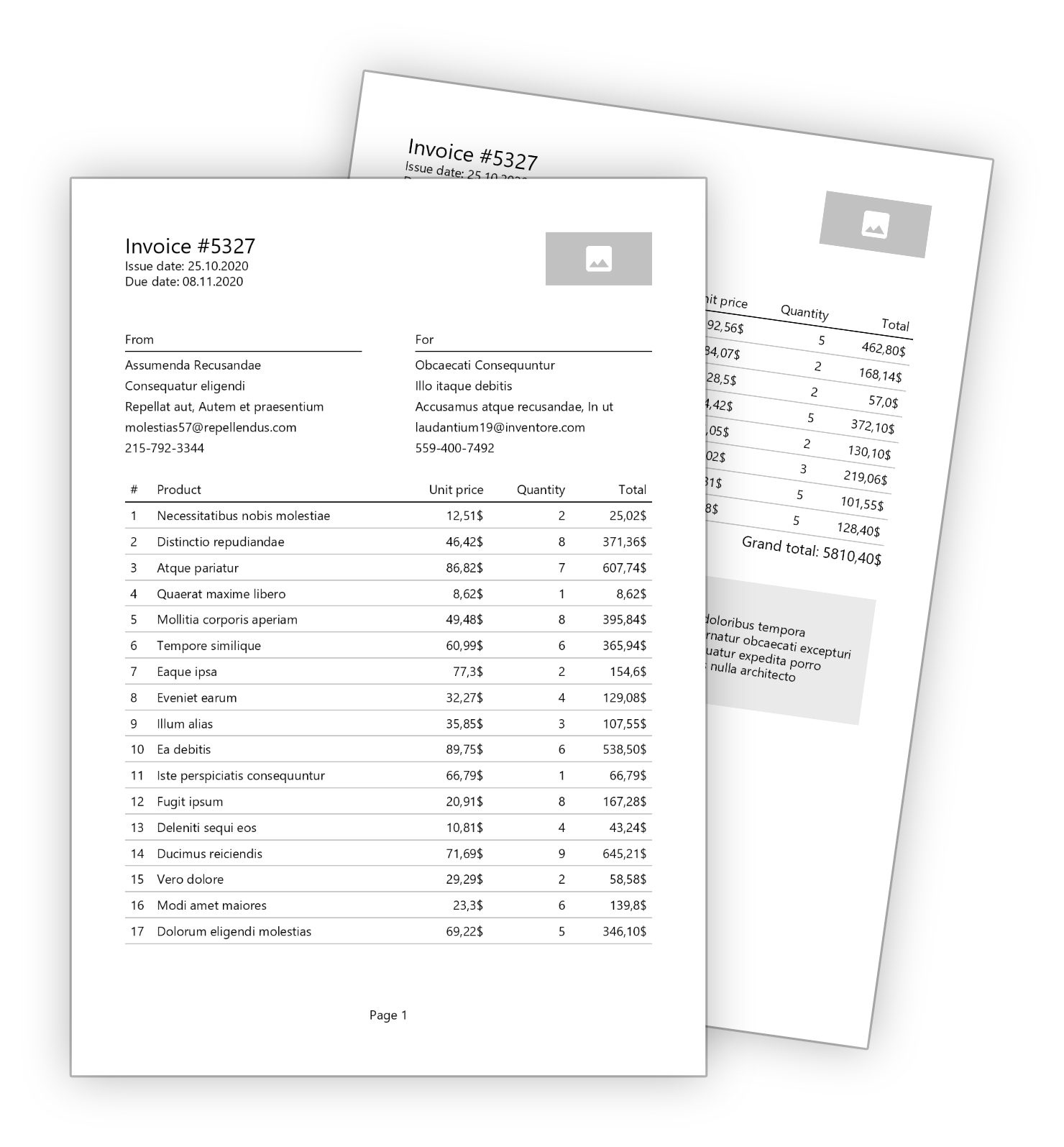
|
||||
|
||||
Here you can find an example code showing how easy is to write and understand the fluent API.
|
||||
[](https://www.questpdf.com/documentation/getting-started.html)
|
||||
A short and easy to follow tutorial showing how to design an invoice document under 200 lines of code.
|
||||
|
||||
|
||||
**General document structure** with header, content and footer:
|
||||
[](https://www.questpdf.com/documentation/api-reference.html)
|
||||
A detailed description of behavior of all available components and how to use them with C# Fluent API.
|
||||
|
||||
```csharp
|
||||
public void Compose(IDocumentContainer container)
|
||||
|
||||
[](https://www.questpdf.com/documentation/patterns-and-practices.html#document-metadata)
|
||||
Everything that may help you designing great reports and create reusable code that is easy to maintain.
|
||||
|
||||
## Simplicity is the key
|
||||
|
||||
How easy it is to start and prototype with QuestPDF? Really easy thanks to its minimal API! Please analyse the code below:
|
||||
|
||||
```#
|
||||
using QuestPDF.Fluent;
|
||||
using QuestPDF.Helpers;
|
||||
using QuestPDF.Infrastructure;
|
||||
|
||||
// code in your main method
|
||||
Document.Create(container =>
|
||||
{
|
||||
container
|
||||
.Page(page =>
|
||||
{
|
||||
page.Margin(50);
|
||||
|
||||
page.Header().Element(ComposeHeader);
|
||||
page.Content().Element(ComposeContent);
|
||||
|
||||
page.Footer().AlignCenter().Text(x =>
|
||||
container.Page(page =>
|
||||
{
|
||||
page.Size(PageSizes.A4);
|
||||
page.Margin(2, Unit.Centimetre);
|
||||
page.Background(Colors.White);
|
||||
page.DefaultTextStyle(x => x.FontSize(20));
|
||||
|
||||
page.Header()
|
||||
.Text("Hello PDF!")
|
||||
.SemiBold().FontSize(36).FontColor(Colors.Blue.Medium);
|
||||
|
||||
page.Content()
|
||||
.PaddingVertical(1, Unit.Centimetre)
|
||||
.Column(x =>
|
||||
{
|
||||
x.Spacing(20);
|
||||
|
||||
x.Item().Text(Placeholders.LoremIpsum());
|
||||
x.Item().Image(Placeholders.Image(200, 100));
|
||||
});
|
||||
|
||||
page.Footer()
|
||||
.AlignCenter()
|
||||
.Text(x =>
|
||||
{
|
||||
x.Span("Page ");
|
||||
x.CurrentPageNumber();
|
||||
x.Span(" / ");
|
||||
x.TotalPages();
|
||||
});
|
||||
});
|
||||
}
|
||||
```
|
||||
|
||||
|
||||
**The header area** consists of basic invoice information along with a logo placeholder.
|
||||
|
||||
```csharp
|
||||
void ComposeHeader(IContainer container)
|
||||
{
|
||||
var titleTextStyle = TextStyle.Default.Size(20).SemiBold().Color(Colors.Blue.Medium);
|
||||
|
||||
container.Row(row =>
|
||||
{
|
||||
{
|
||||
column.Item().Text($"Invoice #{Model.InvoiceNumber}", titleStyle);
|
||||
|
||||
column.Item().Text(text =>
|
||||
{
|
||||
text.Span("Issue date: ", TextStyle.Default.SemiBold());
|
||||
text.Span($"{Model.IssueDate:d}");
|
||||
});
|
||||
|
||||
column.Item().Text(text =>
|
||||
{
|
||||
text.Span("Due date: ", TextStyle.Default.SemiBold());
|
||||
text.Span($"{Model.DueDate:d}");
|
||||
});
|
||||
});
|
||||
|
||||
row.ConstantColumn(100).Height(50).Placeholder();
|
||||
});
|
||||
}
|
||||
})
|
||||
.GeneratePdf("hello.pdf");
|
||||
```
|
||||
|
||||
And compare it to the produced PDF file:
|
||||
|
||||
Implementation of **the content area** that contains seller and customer details, then listing of all bought products, then a comments section.
|
||||

|
||||
|
||||
```csharp
|
||||
void ComposeContent(IContainer container)
|
||||
{
|
||||
container.PaddingVertical(40).column(column =>
|
||||
{
|
||||
column.Spacing(20);
|
||||
|
||||
column.Item().Row(row =>
|
||||
{
|
||||
row.RelativeColumn().Component(new AddressComponent("From", Model.SellerAddress));
|
||||
row.ConstantColumn(50);
|
||||
row.RelativeColumn().Component(new AddressComponent("For", Model.CustomerAddress));
|
||||
});
|
||||
## Are you ready for more?
|
||||
|
||||
column.Item().Element(ComposeTable);
|
||||
The Fluent API of QuestPDF scales really well. It is easy to create and maintain even most complex documents. Read [the Getting started tutorial](https://www.questpdf.com/documentation/getting-started.html) to learn QuestPDF basics and implement an invoice under 200 lines of code. You can also investigate and play with the code from [the example repository](https://github.com/QuestPDF/example-invoice).
|
||||
|
||||
var totalPrice = Model.Items.Sum(x => x.Price * x.Quantity);
|
||||
|
||||
column
|
||||
.Item()
|
||||
.PaddingRight(5)
|
||||
.AlignRight()
|
||||
.Text($"Grand total: {totalPrice}$", TextStyle.Default.SemiBold());
|
||||
|
||||
if (!string.IsNullOrWhiteSpace(Model.Comments))
|
||||
column.Item().PaddingTop(25).Element(ComposeComments);
|
||||
});
|
||||
}
|
||||
```
|
||||
|
||||
|
||||
**The table and comments** codes are extracted into separate methods to increase clarity:
|
||||
|
||||
```csharp
|
||||
void ComposeTable(IContainer container)
|
||||
{
|
||||
var headerStyle = TextStyle.Default.SemiBold();
|
||||
|
||||
container.Table(table =>
|
||||
{
|
||||
table.ColumnsDefinition(columns =>
|
||||
{
|
||||
columns.ConstantColumn(25);
|
||||
columns.RelativeColumn(3);
|
||||
columns.RelativeColumn();
|
||||
columns.RelativeColumn();
|
||||
columns.RelativeColumn();
|
||||
});
|
||||
|
||||
table.Header(header =>
|
||||
{
|
||||
header.Cell().Text("#", headerStyle);
|
||||
header.Cell().Text("Product", headerStyle);
|
||||
header.Cell().AlignRight().Text("Unit price", headerStyle);
|
||||
header.Cell().AlignRight().Text("Quantity", headerStyle);
|
||||
header.Cell().AlignRight().Text("Total", headerStyle);
|
||||
|
||||
header.Cell().ColumnSpan(5)
|
||||
.PaddingVertical(5).BorderBottom(1).BorderColor(Colors.Black);
|
||||
});
|
||||
|
||||
foreach (var item in Model.Items)
|
||||
{
|
||||
table.Cell().Element(CellStyle).Text(Model.Items.IndexOf(item) + 1);
|
||||
table.Cell().Element(CellStyle).Text(item.Name);
|
||||
table.Cell().Element(CellStyle).AlignRight().Text($"{item.Price}$");
|
||||
table.Cell().Element(CellStyle).AlignRight().Text(item.Quantity);
|
||||
table.Cell().Element(CellStyle).AlignRight().Text($"{item.Price * item.Quantity}$");
|
||||
|
||||
static IContainer CellStyle(IContainer container)
|
||||
{
|
||||
container.BorderBottom(1).BorderColor(Colors.Grey.Lighten2).PaddingVertical(5);
|
||||
}
|
||||
}
|
||||
});
|
||||
}
|
||||
```
|
||||
|
||||
```csharp
|
||||
void ComposeComments(IContainer container)
|
||||
{
|
||||
container.ShowEntire().Background(Colors.Grey.Lighten3).Padding(10).column(message =>
|
||||
{
|
||||
message.Spacing(5);
|
||||
message.Item().Text("Comments", TextStyle.Default.Size(14).SemiBold());
|
||||
message.Item().Text(Model.Comments);
|
||||
});
|
||||
}
|
||||
```
|
||||
|
||||
|
||||
**The address details section** is implemented using components. This way the code can be easily reused for both seller and customer:
|
||||
|
||||
```csharp
|
||||
public class AddressComponent : IComponent
|
||||
{
|
||||
private string Title { get; }
|
||||
private Address Address { get; }
|
||||
|
||||
public AddressComponent(string title, Address address)
|
||||
{
|
||||
Title = title;
|
||||
Address = address;
|
||||
}
|
||||
|
||||
public void Compose(IContainer container)
|
||||
{
|
||||
container.ShowEntire().column(column =>
|
||||
{
|
||||
column.Spacing(5);
|
||||
|
||||
column
|
||||
.Item()
|
||||
.BorderBottom(1)
|
||||
.PaddingBottom(5)
|
||||
.Text(Title, TextStyle.Default.SemiBold());
|
||||
|
||||
column.Item().Text(Address.CompanyName);
|
||||
column.Item().Text(Address.Street);
|
||||
column.Item().Text($"{Address.City}, {Address.State}");
|
||||
column.Item().Text(Address.Email);
|
||||
column.Item().Text(Address.Phone);
|
||||
});
|
||||
}
|
||||
}
|
||||
```
|
||||

|
||||
|
||||
@@ -1,8 +1,10 @@
|
||||
- Added a `ScaleToFit` element - scales its child down so it fits in the provided space,
|
||||
- Added a `StopPaging` element - when its child requires more than one page to fully render, only the first page is shown,
|
||||
- Added a 'LineVertical' and a 'LineHorizontal' elements - those will simplify your code a lot, there is no need to use the `Border` element anymore!
|
||||
- Renaming: the `Stack` element was renamed to the `Column` element,
|
||||
- Renaming: children of the `Row` element are now called `items` instead of `columns`, e.g. `RelativeItem` instead of `RelativeColumn`,
|
||||
- Added support of the `AutoItem` to the `Row` element - those items take as little width as possible,
|
||||
- Improved default Fluent configuration behavior for elements: Scale, Padding, Translate,
|
||||
- Improved integration support with the HttpContext.Response.Body. This improvement was introduced by schulz3000, thank you!
|
||||
- Added minimal API to help you quickly start with QuestPDF development and speed up prototyping,
|
||||
- Improved exception message when desired font type cannot be found (instead of loading default font on Windows and failing with wrong characters on Linux),
|
||||
- Improved support for custom font types: loading all type faces from a file, respecting true font family, using CSS-like algorithm to find best style match,
|
||||
- Added support for custom page number formats in the `Text` element, e.g. you can implement roman literal style if required,
|
||||
- Improved text API to make it more concise,
|
||||
- Extended support for the `Section` element (previously the `Location` element) by tracking: beginning page number, end page number, page length, page number within location,
|
||||
- Renaming: the `ExternalLink` element was renamed to the `Hyperlink` element,
|
||||
- Renaming: the `Location` element was renamed to the `Section` element,
|
||||
- Renaming: the `InternalLink` element was renamed to the `SectionLink` element,
|
||||
- Updated homepage and GitHub pages content.
|
||||
|
||||
@@ -1,23 +1,51 @@
|
||||
<a href="https://www.questpdf.com/">
|
||||
<img src="https://github.com/QuestPDF/example-invoice/raw/main/images/logo.svg" width="400px">
|
||||
<a href="https://www.questpdf.com/" target="_blank">
|
||||
<img src="https://github.com/QuestPDF/example-invoice/raw/main/images/logo.svg" width="300">
|
||||
</a>
|
||||
|
||||
QuestPDF presents a new approach to PDF document generation. Unlike other libraries, it does not rely on the HTML-to-PDF conversion which in many cases is not reliable. Instead, it implements its own layouting engine that is optimized to cover all paging-related requirements. Then, everything is rendered using the SkiaSharp library (a Skia port for .NET, used in Chrome, Android, MAUI, etc.).
|
||||
---
|
||||
|
||||
I have designed this layouting engine with full paging support in mind. The document consists of many simple elements (e.g. border, background, image, text, padding, table, grid etc.) that are composed together to create more complex structures. This way, as a developer, you can understand the behaviour of every element and use them with full confidence. Additionally, the document and all its elements support paging functionality. For example, an element can be moved to the next page (if there is not enough space) or even be split between pages like table's rows.
|
||||
[](https://www.nuget.org/packages/QuestPDF/)
|
||||
[](https://github.com/QuestPDF/QuestPDF/stargazers)
|
||||
[](https://www.nuget.org/packages/QuestPDF/)
|
||||
[](https://www.nuget.org/packages/QuestPDF/)
|
||||
[](https://github.com/QuestPDF/QuestPDF/blob/main/LICENSE)
|
||||
[](https://github.com/sponsors/QuestPDF)
|
||||
|
||||
## Support QuestPDF
|
||||
QuestPDF is an open-source .NET library for PDF documents generation.
|
||||
|
||||
All great frameworks and libraries started from zero. Please help me make QuestPDF a commonly known library and an obvious choice for generating PDF documents.
|
||||
It offers a layouting engine designed with a full paging support in mind. The document consists of many simple elements (e.g. border, background, image, text, padding, table, grid etc.) that are composed together to create more complex structures. This way, as a developer, you can understand the behavior of every element and use them with full confidence. Additionally, the document and all its elements support paging functionality. For example, an element can be moved to the next page (if there is not enough space) or even be split between pages like table's rows.
|
||||
|
||||
- ⭐ Give this repository a star,
|
||||
- 💬 Share it with your team members.
|
||||
Unlike other libraries, it does not rely on the HTML-to-PDF conversion which in many cases is not reliable. Instead, it implements its own layouting engine that is optimized to cover all paging-related requirements.
|
||||
|
||||
## Please show the value
|
||||
|
||||
Choosing a project dependency could be difficult. We need to ensure stability and maintainability of our projects. Surveys show that GitHub stars count play an important factor when assessing library quality.
|
||||
|
||||
⭐ Please give this repository a star. It takes seconds and help thousands of developers!
|
||||
|
||||
## Please share with the community
|
||||
|
||||
As an open-source project without funding, I cannot afford advertising QuestPDF in a typical way. Instead, the library relies on community interactions. Please consider sharing a post about QuestPDF and the value it provides. It really does help!
|
||||
|
||||
[](https://reddit.com/submit?url=https://github.com/QuestPDF/QuestPDF&title=QuestPDF)
|
||||
[](https://news.ycombinator.com/submitlink?u=https://github.com/QuestPDF/QuestPDF)
|
||||
[](https://twitter.com/share?url=https://github.com/QuestPDF/QuestPDF&t=QuestPDF)
|
||||
[](https://www.facebook.com/sharer/sharer.php?u=https://github.com/QuestPDF/QuestPDF)
|
||||
[](https://www.linkedin.com/shareArticle?url=https://github.com/QuestPDF/QuestPDF&title=QuestPDF)
|
||||
|
||||
## Support development
|
||||
|
||||
It doesn't matter if you are a professional developer, creating a startup or work for an established company. All of us care about our tools and dependencies, about stability and security, about time and money we can safe, about quality we can offer. Please consider sponsoring QuestPDF to give me an extra motivational push to develop the next great feature.
|
||||
|
||||
> If you represent a company, want to help the entire community and show that you care, please consider sponsoring QuestPDF using one of the higher tiers. Your company logo will be shown here for all developers, building a strong positive relation.
|
||||
|
||||
[](https://github.com/sponsors/QuestPDF)
|
||||
|
||||
## Installation
|
||||
|
||||
The library is available as a nuget package. You can install it as any other nuget package from your IDE, try to search by `QuestPDF`. You can find package details [on this webpage](https://www.nuget.org/packages/QuestPDF/).
|
||||
|
||||
```c#
|
||||
```xml
|
||||
// Package Manager
|
||||
Install-Package QuestPDF
|
||||
|
||||
@@ -25,16 +53,26 @@ Install-Package QuestPDF
|
||||
dotnet add package QuestPDF
|
||||
|
||||
// Package reference in .csproj file
|
||||
<PackageReference Include="QuestPDF" Version="2022.2.5" />
|
||||
<PackageReference Include="QuestPDF" Version="2022.3.1" />
|
||||
```
|
||||
|
||||
[](https://www.nuget.org/packages/QuestPDF/)
|
||||
|
||||
## Documentation
|
||||
|
||||
**[🚀 Getting started tutorial](https://www.questpdf.com/documentation/getting-started.html)** - a short and easy to follow tutorial showing how to design an invoice document under 200 lines of code.
|
||||
[](https://www.questpdf.com/documentation/getting-started.html)
|
||||
A short and easy to follow tutorial showing how to design an invoice document under 200 lines of code.
|
||||
|
||||
**[📖 API Reference](https://www.questpdf.com/documentation/api-reference.html)** - a detailed description of behavior of all available components and how to use them with C# Fluent API.
|
||||
|
||||
**[ℹ️ Patterns and practices](https://www.questpdf.com/documentation/patterns-and-practices.html#document-metadata)** - everything that may help you designing great reports and create reusable code that is easy to maintain.
|
||||
[](https://www.questpdf.com/documentation/api-reference.html)
|
||||
A detailed description of behavior of all available components and how to use them with C# Fluent API.
|
||||
|
||||
|
||||
[](https://www.questpdf.com/documentation/patterns-and-practices.html#document-metadata)
|
||||
Everything that may help you designing great reports and create reusable code that is easy to maintain.
|
||||
|
||||
|
||||
<!-- 🚀 📖 ℹ️-->
|
||||
|
||||
## Simplicity is the key
|
||||
|
||||
@@ -53,10 +91,11 @@ Document.Create(container =>
|
||||
page.Size(PageSizes.A4);
|
||||
page.Margin(2, Unit.Centimetre);
|
||||
page.Background(Colors.White);
|
||||
page.DefaultTextStyle(TextStyle.Default.Size(20));
|
||||
page.DefaultTextStyle(x => x.FontSize(20));
|
||||
|
||||
page.Header()
|
||||
.Text("Hello PDF!", TextStyle.Default.SemiBold().Size(36).Color(Colors.Blue.Medium));
|
||||
.Text("Hello PDF!")
|
||||
.SemiBold().FontSize(36).FontColor(Colors.Blue.Medium);
|
||||
|
||||
page.Content()
|
||||
.PaddingVertical(1, Unit.Centimetre)
|
||||
@@ -82,10 +121,10 @@ Document.Create(container =>
|
||||
|
||||
And compare it to the produced PDF file:
|
||||
|
||||
|
||||
<img src="https://raw.githubusercontent.com/QuestPDF/QuestPDF-Documentation/main/images/minimal-api.png" width="250px">
|
||||
|
||||
## Are you ready for more?
|
||||
|
||||
The Fluent API of QuestPDF scales really well. It is easy to create and maintain even most complex documents. Read [the Getting started tutorial](https://www.questpdf.com/documentation/getting-started.html) to learn QuestPDF basics and implement an invoice under 200 lines of code. You can also investigate and play with the code from [the example repository](https://github.com/QuestPDF/example-invoice).
|
||||
|
||||
<img src="https://github.com/QuestPDF/example-invoice/raw/main/images/invoice.png" width="595px">
|
||||
<img src="https://github.com/QuestPDF/example-invoice/raw/main/images/invoice.png" width="400px">
|
||||
|
||||
Reference in New Issue
Block a user